




Listen to bôa - Duvet while reading!
Disclaimer: this is an anonymized post-mortem. All IP addresses, hostnames, company names, customer details and exact dates have been removed or generalized. No customer data was harmed in the making of this blog post. Published for educational purposes only.
TL;DR
- A small production server (an ERP SaaS running in Docker: app + PostgreSQL) was compromised.
- The root cause was not a fancy exploit: a database port published to the internet with a weak, guessable password, on a user that is a superuser by default.
- The attacker used PostgreSQL's own
COPY ... FROM PROGRAMfeature to run shell commands, dropped a Monero miner (XMRig) with disguised names, and used the box to scan the internet until our hosting provider's abuse desk came knocking. - The server ran out of memory, the kernel started killing processes, and eventually you couldn't even keep an SSH shell alive.
- We did offline forensics (booted a rescue image, mounted the disk read-only, inspected Docker's writable layers), extracted every byte of customer data through the serial console (yes, base64 at ~30 KB/s, chunked and hash-verified), audited the data for tampering, and rebuilt everything from scratch.
- Lessons at the bottom. If you only read one: never publish your database port to the internet. Ever.
The setup
Like a lot of small teams, we ran lean: one cloud VM, a Docker Compose stack with an ERP application and a PostgreSQL container, a reverse proxy in front, automated uploads to object storage, and a dream. It had served us well for months.
The Compose file had the kind of line that looks harmless and isn't:
services:
  db:
    image: postgres:14
    ports:
      - "5450:5432"              # published on 0.0.0.0
    environment:
      - POSTGRES_USER=app
      - POSTGRES_PASSWORD=<a weak, guessable password>
Two details that matter later:
ports:publishes the database on every network interface — i.e., the whole internet can reach it.- With the official Postgres image,
POSTGRES_USERis created as a superuser of the cluster.
Symptom #1: an abuse report
It started with an email I almost filed under "bureaucracy": an abuse report saying our server's IP had been port-scanning a third party.
An abuse report is not spam. It's a smoke alarm. When someone's infrastructure tells you your machine is scanning them, your machine is either: (a) doing something it shouldn't, (b) compromised, or (c) both. In our case: both.
Symptom #2: the machine that killed its own shell
Around the same time, logging into the console showed a wall of kernel messages:
Out of memory: Killed process 2918112 (python3) total-vm:50500kB
Out of memory: Killed process 2845644 (auditd)  total-vm:306540kB, ...
Out of memory: Killed process 34588 (python3)   total-vm:5004600kB
The OOM killer was working overtime. Hundreds of processes, over several hours. Even the admin shell got killed on login — that's how you know it's not "a heavy workload, let's add more RAM". Something was spawning processes in a loop and eating everything.
One more detail worth noting: the kernel log timestamps showed over a year of uptime. Meaning: many security updates were installed but never activated by a reboot. (Reboots are security patches. Plan them.)
Accessing a machine whose shell dies
When the OS can't stay alive long enough to be useful, you stop fighting it. The playbook:
- Pull the plug. Shut the VM down. This stops the miner, the scanning, and the phone-home traffic immediately.
- Boot into rescue mode from the provider (a clean, memory-resident Linux image).
- Mount the production disk — read-only. Never boot the compromised OS again, and don't trust its
ps, its binaries, or its logs. A compromised OS lies. - Analyze the disk like a crime scene.
A detail that saved us: the "normal" way to run commands on that provider's console (a serial console) only gives you a shell — it can't transfer files. And in rescue mode, the VM's TCP networking was misbehaving in a way that will get its own section below. So step 4 happened entirely from a mounted, offline disk.
The find: malware inside a container's writable layer
Docker stores each container as read-only image layers plus one writable layer per
container at /var/lib/docker/overlay2/<id>/diff/. Anything the container writes at
runtime — including anything the attacker drops — lives there, not in the image.
Sorting recently modified files inside the database container's layer, a very ugly picture appeared:
.../diff/var/lib/postgresql/sh                         125 KB   ← loader
.../diff/var/lib/postgresql/auditd                     9.8 MB   ← XMRig, renamed
.../diff/var/lib/postgresql/.cache/sh, .cache/auditd             ← hidden copies
.../diff/var/lib/postgresql/.config/autostart/xr-sync.desktop   ← persistence
.../diff/var/lib/postgresql/.bashrc, .profile                    ← persistence
.../diff/tmp/.rsyslogd.log                             281 MB   ← fake log
.../diff/tmp/{run.sh,mon.sh,nuclear,runnv}                       ← helper payloads
The auditd binary wasn't an audit daemon — it answered with a banner:
* ABOUT XMRig/6.26.0 (built for Linux x86-64, 64 bit)
And the attacker's own log file was remarkably chatty:
[INFO] MAIN  PHONK666: XR_ALREADY_RUNNING_USER:auditd:...
[DBG]  C2_TRY   <redacted>
[DBG]  C2       C2_OK
... (repeating every ~2 minutes)
A cryptominer with a command-and-control heartbeat, persistence in shell init files and
XDG autostart, self-copies hidden in .cache/, and process/file names chosen to look boring
(auditd! .rsyslogd.log!). This is the signature of a known family of campaigns that
specifically hunt exposed PostgreSQL servers — see
PGMiner,
PG_MEM and
this Wiz write-up on a later, fileless variant.
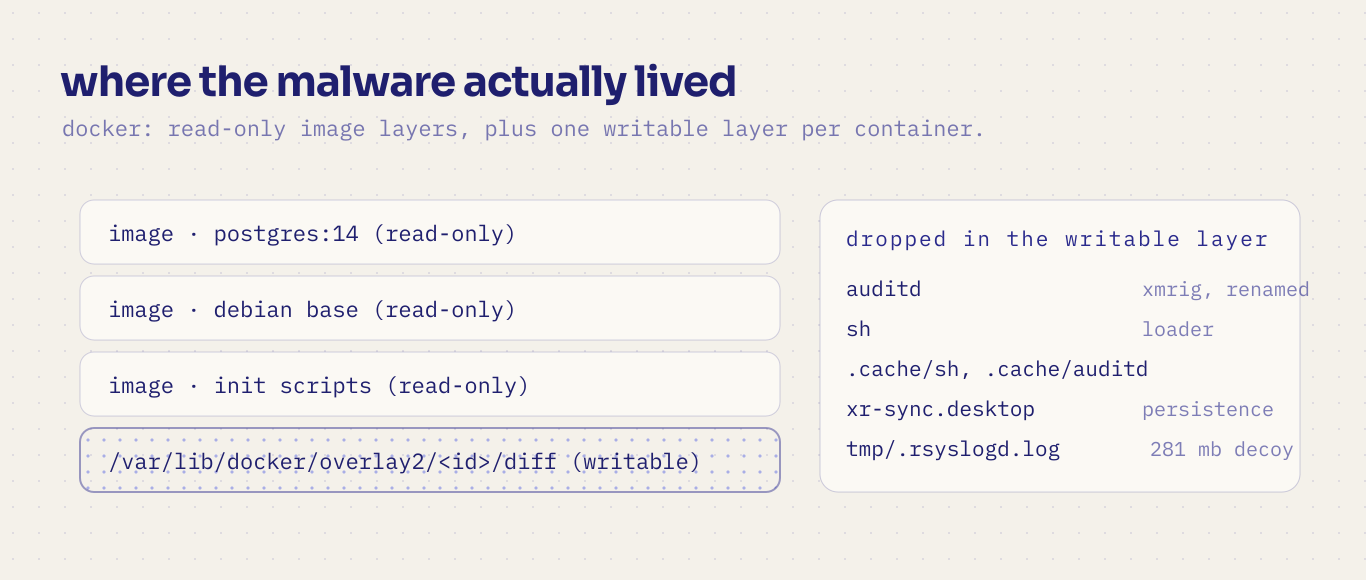
the miner lived in the container's writable layer, not in the image. that is where you look.
Root cause: not an exploit — a superpower left on the doorstep
Here's the uncomfortable part. Nothing was "hacked" in the movie sense:
- The database was reachable from the internet (
ports: "5450:5432"). - The password was weak and guessable (automated campaigns brute-force these 24/7).
POSTGRES_USERwas a superuser, and Postgres ships withCOPY ... FROM PROGRAM— a legitimate feature that lets a superuser run OS commands from SQL.
So the attacker "logged in" and ran:
COPY t FROM PROGRAM 'sh -c "<fetch and run something>"';
Game over. From the database's point of view, nothing abnormal happened. From ours, a container that we thought was "just a database" became a workstation on the attacker's payroll.
For defenders, the takeaway is blunt: a superuser connection equals OS command execution. Treat database credentials like SSH keys.
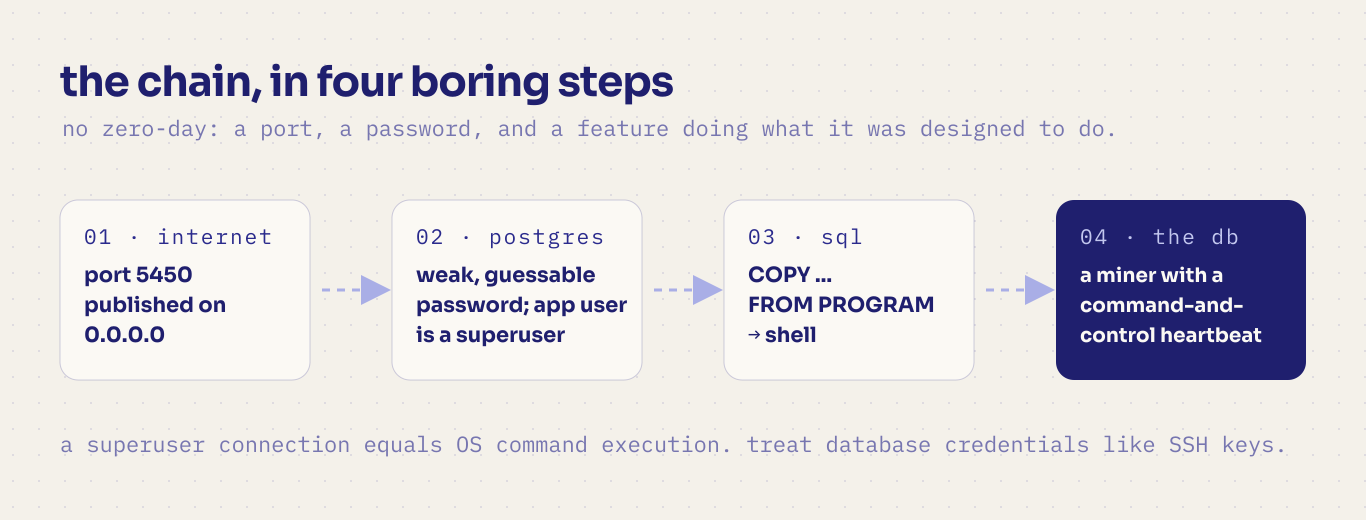
the whole attack, in four boring steps. no exploit required.
The extraction: 30 KB/s over a serial console
This was my favorite (and most painful) part.
When the data was safe on the disk but the machine had to be rebuilt, we hit a wall: the VM's network was dead in the rescue environment — ICMP worked, but TCP and UDP went nowhere, in both normal and rescue boots. Meanwhile, we had ~230 MB of backups to move out and a cloud console (a serial line) that could only display text.
So the serial console became the network:
# On the server: emit the file in fixed-width base64 between unique markers
echo '===BEGIN===' ; base64 -w 40 /path/to/file ; echo '===END==='
Capture the console session to a file, extract the base64 between markers, decode, verify SHA-256 against the server copy. Transfer speed? ~30 KB/s — a 1 MB file takes ~35 seconds. A few million bytes invites corruption, so we:
- Chunked files (1.5 MB pieces) and printed a header per chunk:
===PART <name> <sha256> <bytes>===…===ENDPART=== - Decoded locally with a small Python script that verified size + hash per chunk, so a corrupted piece could be re-sent in isolation instead of redoing the whole file.
- Learned that
script(1)buffers its typescript output — after finishing a transfer we printed a few KB of junk (head -c 8000 /dev/zero | base64) just to force a flush before decoding. - Automated the whole loop by piping commands into the console session programmatically
(we were already using a terminal workspace manager that exposes an API — but even a
tmux send-keysscript would do).
Everything arrived byte-perfect, verified hash by hash. Total: a couple of hours of transfer for a story I'll be telling for years.
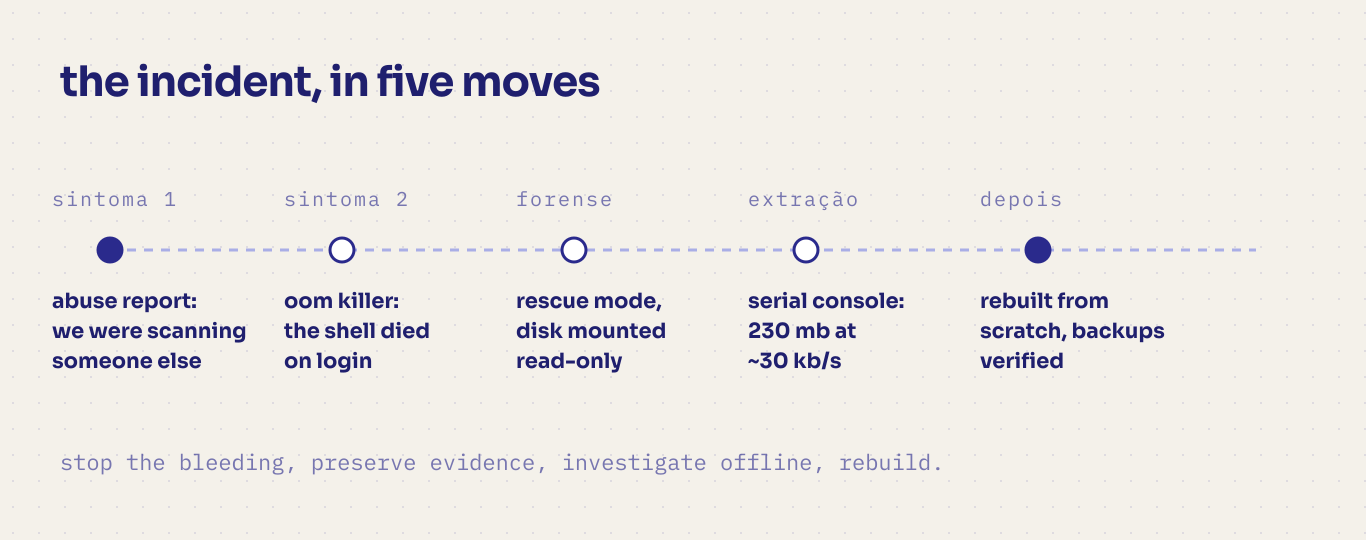
from a smoke alarm to a rebuilt server, in five moves.
But did the attacker touch the customer data?
This is the question that keeps you up at night, and "we hope not" is not an answer. We audited two things:
1. Attachments. The ERP stores each attachment with a filename equal to the SHA-1 of its content. That's a built-in integrity check: for every file, we recomputed the SHA-1 and compared it to the name. Also: no files with unexpected names, no executables.
538 files checked → 0 mismatches
119 files checked → 0 mismatches
2. The database itself. We restored the dumps into a clean PostgreSQL and queried the catalogs for anything an intruder might leave behind:
- unexpected roles / new superusers
- functions, triggers or event triggers containing shell-ish code
- non-standard languages (e.g., untrusted
plpython/C) - server actions, scheduled jobs and automations created during the incident window
- suspicious patterns in application-level automated code
Result: nothing. No malicious persistence. Data intact.
Honest caveat: integrity is not confidentiality. The attacker held superuser credentials — they could have read data. We treated the incident with the rigor the privacy law required (a subject for another post, and definitely a subject for your legal team), because "we found no tampering" and "we can prove nothing was read" are very different sentences.
What we changed (the checklist I wish we'd started with)
Network
- Cloud firewall with default deny. Only 80/443 public; SSH restricted to our IPs.
- Never publish database ports. Containers talk over the internal Docker network. Need remote access? SSH tunnel or VPN. Full stop.
Secrets
- Strong, unique passwords (generated, 32+ chars), stored in a secret manager — not in
a Compose file, not in git, not in a plaintext
.envthat the app container can read. - Rotate everything that ever touched the compromised host.
Database
- Application user should not be a superuser. Review
pg_hba.conf(internal network only,scram-sha-256), enablelog_connections, and consider auditing/blockingCOPY ... FROM PROGRAMfor defense in depth.
Host & containers
- Patch and reboot. Uptime badges are not a flex.
- Pin and update images; set memory/CPU limits; mount code read-only when possible.
- The Docker API socket stays local. Always.
Detection
- OOM events, sustained high CPU, huge files appearing in
/tmp, unknown outbound connections: these are incident signals, not "performance problems". Alert on them. - Treat abuse reports as security alerts, and reply to them.
- Backups: automated, offsite, and tested. Ours are the only reason this story has a happy ending.
Response
- Contain first (stop the bleeding), preserve evidence (snapshot!), investigate offline, and rebuild — never "clean" a compromised host.
- Write the post-mortem while it's fresh. You'll thank yourself later.
Closing thoughts
The uncomfortable truth about this incident is how boring it was. No zero-day, no supply-chain wizardry — just a port, a password, and a feature doing exactly what it was designed to do. Attackers don't need to be clever when defenders leave the door open.
If this story makes one person run docker ps --format '{{.Names}} {{.Ports}}' and delete
a 0.0.0.0:5432 from their Compose file today, it was worth writing.
Stay patched, keep your databases private, and verify your backups. See you next post.